By TojoIn Jacket9 min read
The best jacket mockup is a layered PSD with a Smart Object for the fabric, believable folds and shadows, and a pixel size that fits where the image will end up. Start with the free Double Breasted Jacket Mockup to test the workflow. Pick the Jacket Mockup PSD for a clean general-purpose jacket. Pick the PSD Jacket Mockup for a safari-style utility look with four front pockets. Choose the Peak Lapel template for tailored jackets, and the Woman Jacket Mockup for womenswear.
Searching for a free jacket mockup usually ends the same way. You click a thumbnail and land on a flat vector sketch, a low-resolution image, or a stock listing with no editable layers. Then you spend an hour masking and warping just to make a logo sit properly on a sleeve or chest. A good template removes that work, because the folds, seams and shadows are already built in.
This article compares five jacket mockup PSD templates from ShirtsMockup, so every size, price and file count comes straight from the product pages. After the list, you get a side-by-side table, a short Photoshop routine for adding your logo, and a note on front and back views, workwear branding and licensing.
1. Double Breasted Jacket Mockup
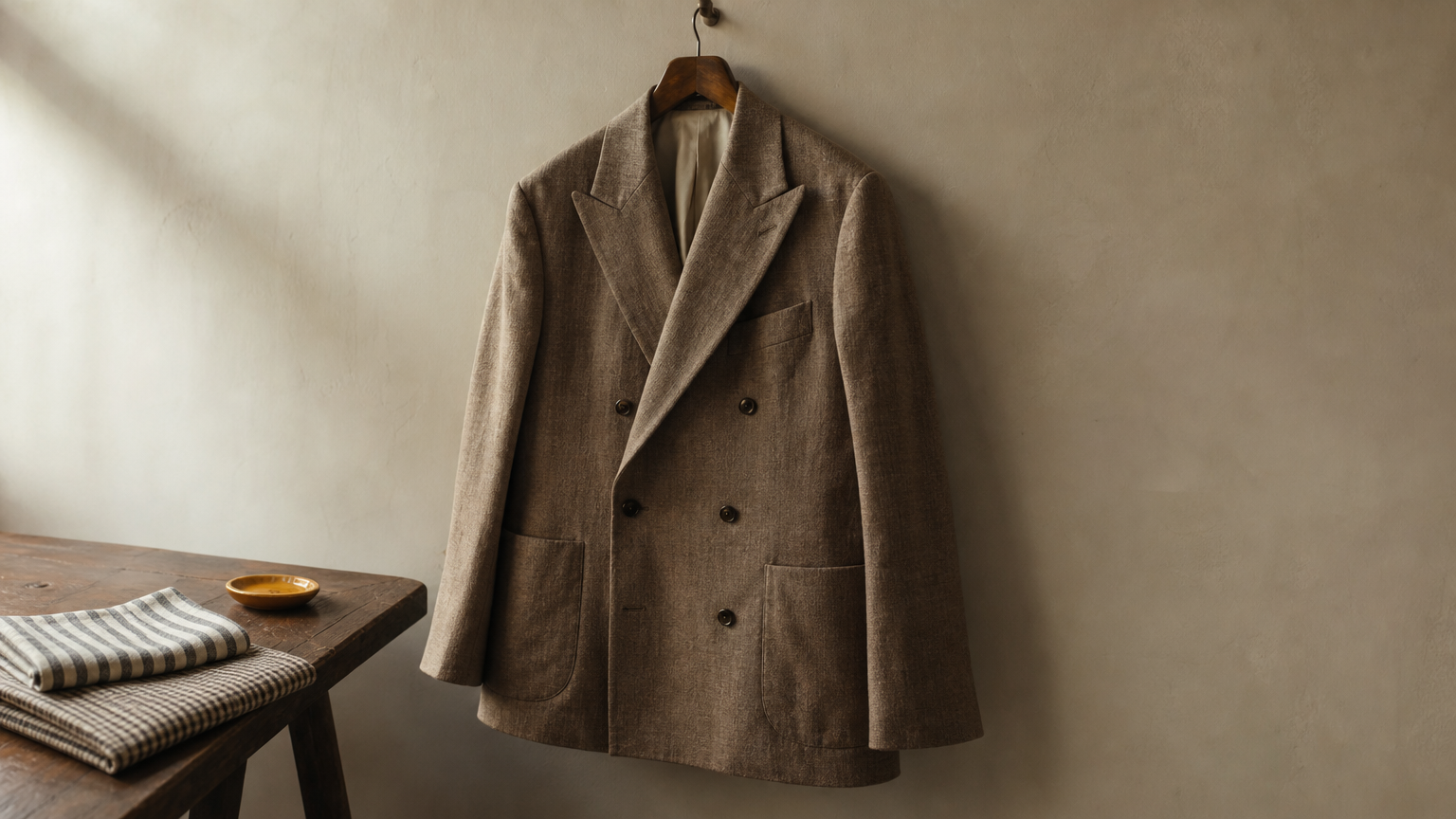
The Double Breasted Jacket Mockup is the free pick, and the best place to start if you want a real free jacket mockup PSD with a Smart Object and not just a flat sketch.
What you get
This is a layered, fully editable Photoshop file of a double-breasted jacket. Double-click the Smart Object, drop in your texture or repeatable pattern, and save. A Liquify filter then wraps the fabric over the jacket, so stripes and checks follow the cloth instead of lying flat. The file works with Photoshop CC 2023 or later.
A free jacket mockup is only worth your time when it ships with layers, a Smart Object and 300 DPI.
- 2291 x 2727 px at 300 DPI
- 1 layered PSD file
- 5 sample jacket fabrics and 5 sample lining fabrics
- 10 repeatable jacket fabrics and 10 repeatable lining fabrics
- 2 .PAT files and a video help file
Who it suits and what it costs
It costs nothing, so it suits designers testing a new workflow, small brands that need a first product image, and store owners who want to check the quality before paying for anything. The limit is the cut. It shows one double-breasted jacket, so if your design is single-breasted, move on to one of the paid files below.
Free does not mean unlicensed. The same ShirtsMockup license terms apply to free files, so read them before you use the image commercially.
2. Jacket Mockup PSD
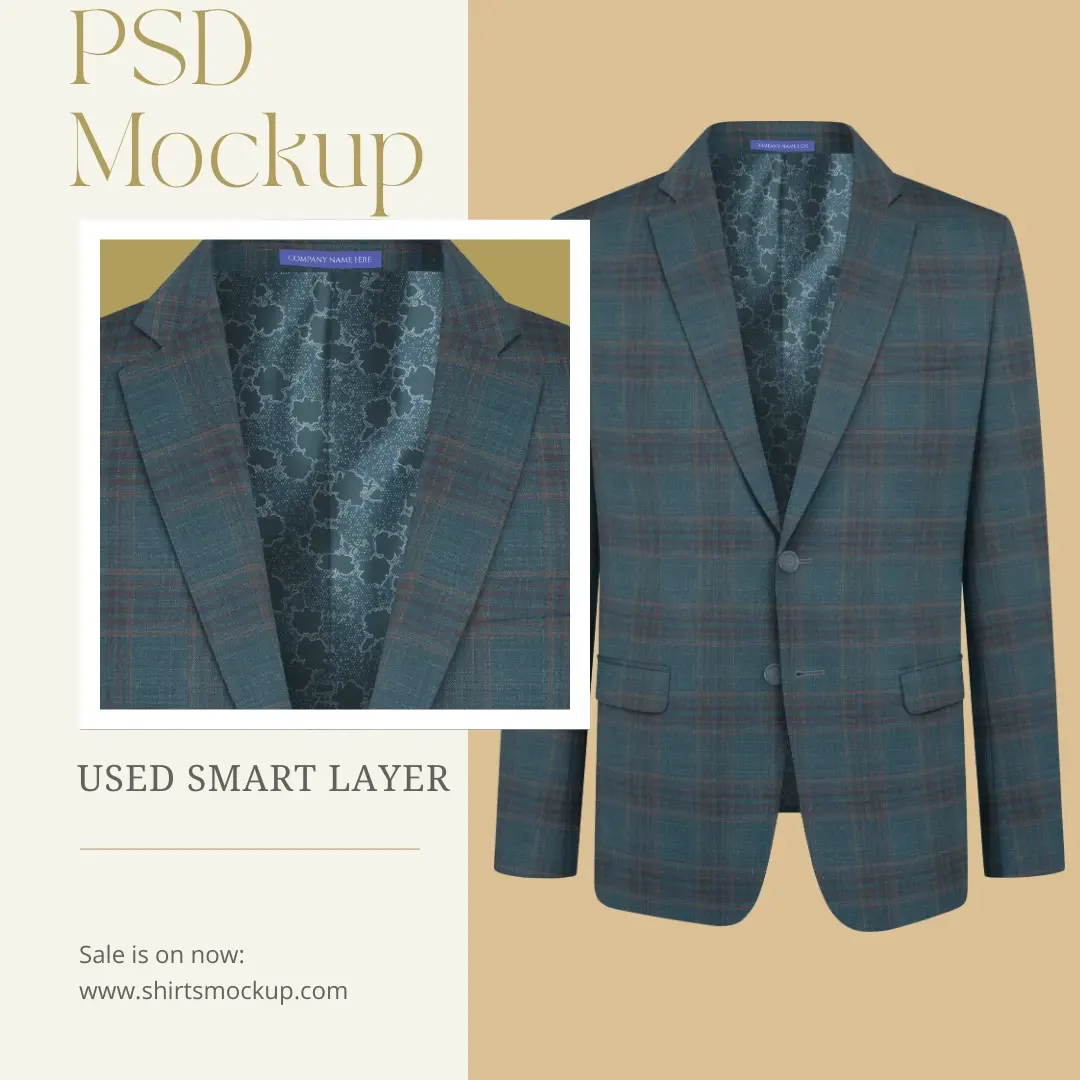
The Jacket Mockup PSD costs $15 and is the all-round pick when you want a fast jacket design mockup with two ways to apply fabric.
What you get
You get one layered PSD at 1920 x 3110 px and 300 DPI, which prints at about 6.4 x 10.4 inches at full resolution. The Smart Object handles fabric and pattern replacement. A Pattern Overlay option gives you a second route if a texture wraps badly. Each element sits on its own layer, and a Liquify filter keeps the fabric smooth. It needs Photoshop CC 2023 or later.
Two ways to apply fabric means one of them will usually work, even with awkward patterns.
- 5 sample jacket fabrics and 5 sample lining fabrics
- 10 repeatable jacket fabrics and 10 repeatable lining fabrics
- 2 .PAT files and a video link
Who it suits and what it costs
At $15, this works for designers previewing jacket fabrics before production, brands building product images, and store owners without a photographer. Check the preview on the product page to confirm the cut matches your design, because the file is a general jacket and not a specialty style.
The tall format suits product pages and lookbook layouts. It is less suited to large banners, where the 300 DPI size limits how big you can print.
3. PSD Jacket Mockup
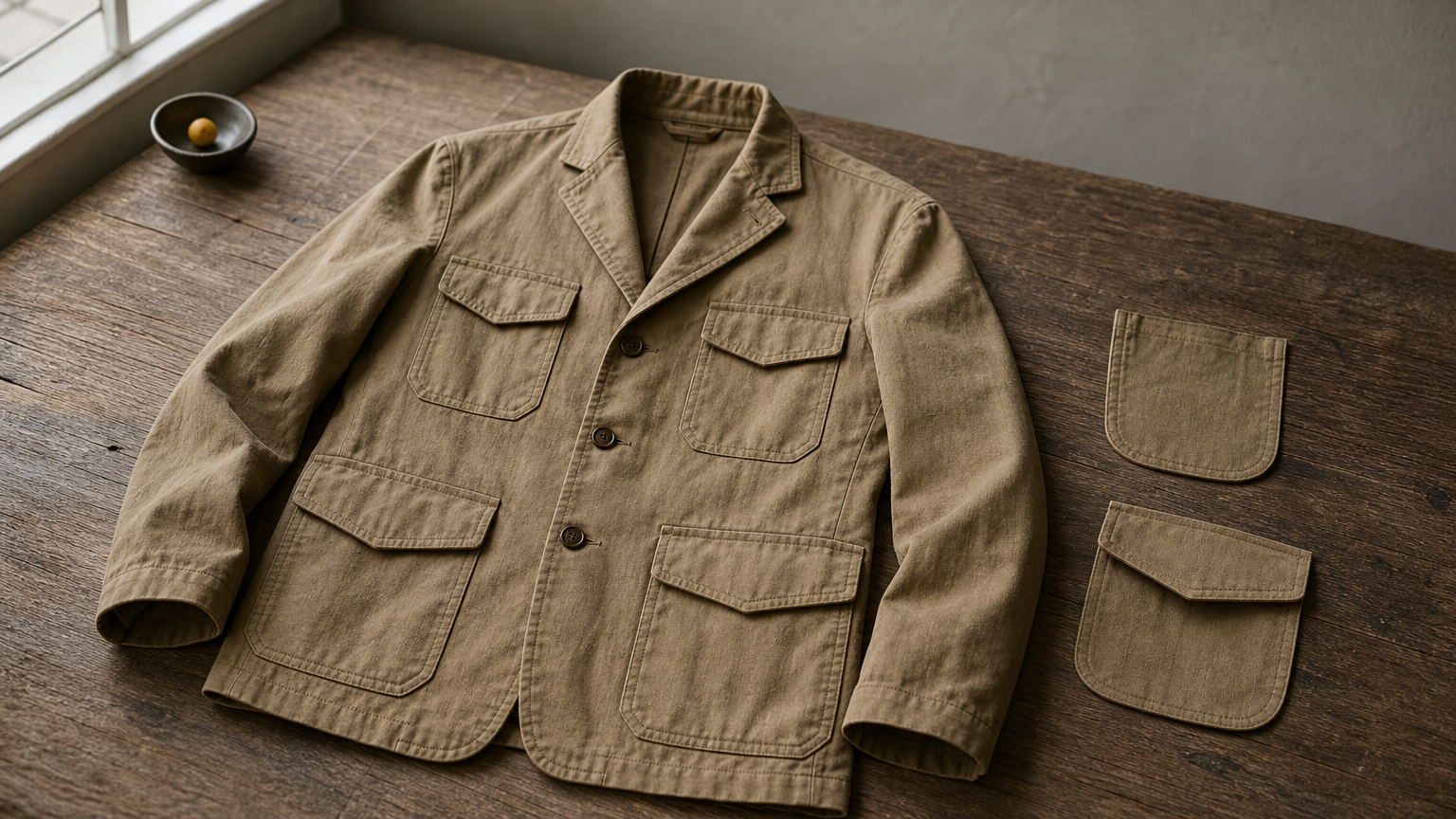
The PSD Jacket Mockup is a safari-style jacket with four front pockets, which makes it the closest fit for a work jacket mockup or utility range. It costs $18.
What you get
The jacket has a notch lapel, a button-down front and four front pockets. The file offers five pocket styles: welted ticket pocket with patch pocket, patch pocket, slanted regular pockets, regular flap pockets and standard pocket. You swap fabric through the Smart Object, and a Pattern Overlay option is available too. It is 3200 x 4000 px at 140 DPI and needs Photoshop CC 2023 or later.
Pocket options matter most for workwear, where the pocket layout is part of the design.
- 1 layered PSD file
- 5 sample jacket fabrics and 5 sample lining fabrics
- 10 repeatable jacket fabrics and 10 repeatable lining fabrics
- 2 .PAT files and a video tutorial
Who it suits and what it costs
Choose it if you design field, utility or casual jackets, or need to show clients several pocket layouts without rebuilding the file. The 140 DPI tag matters less than the pixel count. At 3200 x 4000 px, you have enough for an 8 x 10 inch print at 300 DPI.
If you want the same pocket options on a classic notch lapel jacket with double patch pockets, the PSD Custom Jacket Mockup is the sibling file, also at $18.
4. Photo-Realistic PSD Jacket Mockup with Peak Lapel
The Photo-Realistic PSD Jacket Mockup Template with Peak Lapel is the tailored option, and at $19 it is the most expensive of the five.
What you get
It shows a peak lapel jacket in 2291 x 2727 px at 300 DPI. The Smart Object takes your texture or pattern, a Pattern Overlay option offers a second method, and a Liquify filter smooths the wrap. A video guide is included. It works with Photoshop CC 2023 or later.
Peak lapels read as formal and tailored, so this file suits jackets where the lapel shape is the selling point.
- 1 layered PSD file
- 5 sample jacket fabrics and 5 sample lining fabrics
- 10 repeatable jacket fabrics and 10 repeatable lining fabrics
- 2 .PAT files and a video link
Who it suits and what it costs
It suits tailors, menswear brands and designers who present suiting fabrics or plaids and need the lapel to look sharp. At 300 DPI, the image prints at about 7.6 x 9.1 inches, which covers product pages, banners and client decks.
The $19 price buys a specific silhouette, not extra features. If you do not need a peak lapel, the cheaper files above give you the same Smart Object workflow.
5. Woman Jacket Mockup
The Woman Jacket Mockup is the pick for womenswear, and at 4234 x 5000 px it is the largest file of the five. It costs $17.
What you get
The file is layered, photo-realistic and built around a women's jacket. At 300 DPI, the pixel size prints at about 14.1 x 16.7 inches, so you can crop tightly for detail shots and still have sharp output. The Smart Object takes your fabric or pattern, and a Liquify filter handles the wrapping. It needs Photoshop CC 2023 or later.
Extra resolution gives you room to crop, so one file can produce a full shot and a detail shot.
- 1 layered PSD file
- 5 sample women's jacket fabrics and 5 sample lining fabrics
- 10 repeatable women's jacket fabrics and 10 repeatable lining fabrics
- 2 .PAT files and a video link
Who it suits and what it costs
It suits womenswear brands, designers previewing fabrics for women's jackets, and store owners who want large product images. Men's templates do not fit women's patterns, so using a dedicated file saves you from visible fit problems in your listings.
At $17, it sits in the middle of the price range. The extra pixels are the main reason to pick it over a cheaper file.
How to choose a jacket mockup and add your logo
Match the cut to your design first, then check resolution and license, then add your logo as its own layer. Here is how the five compare, and how to finish the job in Photoshop.
Compare the five side by side
| Mockup | Price | Size | Style |
|---|---|---|---|
| Double Breasted Jacket Mockup | Free | 2291 x 2727 px, 300 DPI | Double-breasted |
| Jacket Mockup PSD | $15 | 1920 x 3110 px, 300 DPI | General jacket |
| PSD Jacket Mockup | $18 | 3200 x 4000 px, 140 DPI | Safari, four pockets |
| Peak Lapel Jacket Mockup | $19 | 2291 x 2727 px, 300 DPI | Peak lapel |
| Woman Jacket Mockup | $17 | 4234 x 5000 px, 300 DPI | Women's |
Work backward from your output. An 8 x 10 inch print at 300 DPI needs 2400 x 3000 px. The 2291 x 2727 px files reach about 7.6 x 9.1 inches at that quality, while the 3200 x 4000 px and 4234 x 5000 px files clear 8 x 10 with room to crop. For web listings at around 1000 px wide, any of the five is more than enough.
Put your logo on the jacket in Photoshop
You can place a jacket logo mockup in a few minutes once the fabric is set:
- Open the PSD and double-click the jacket's Smart Object layer.
- Replace the fabric with a solid color, texture or repeatable pattern, then save and close the Smart Object.
- Place your logo as a separate layer above the jacket fabric, and scale it to the chest or sleeve.
- Use Edit > Transform > Warp to follow the curve of the cloth.
- Set the blend mode to Multiply, or lower the opacity slightly, so the folds and shadows show through the logo.
- Export as JPG or PNG through File > Export.
Keep the logo layer separate. That way, you can swap one logo for another and re-export a whole set of colorways without redoing the jacket.
Front and back views, workwear and licensing
If you need a front and back set, check each product page for the views included. The PSD Blazer Mockup and Custom Blazer Mockup both list front and back views.
For corporate or workwear branding, pair a utility jacket like the PSD Jacket Mockup with a small chest logo, and show the same jacket in two or three colorways. Licensing needs care. A ShirtsMockup license covers one project, additional projects need additional licenses, and the terms prohibit use in print-on-demand or create-on-demand services where an end user customizes a product.
Start with the free file
The right jacket mockup comes down to four checks: a Smart Object for fabric, a cut that matches your design, enough pixels for your output, and a license that covers how you will use it. Each of the five files here meets the first check, and the differences are style, size and price.
If you are unsure, test the workflow before you spend anything. Try the free Double Breasted Jacket Mockup, swap in one fabric and one logo, and see how the result looks in your own listings. Then choose the paid file that fits your cut.

Comments
No comments yet. Start the conversation.